
| サンプル集 |
|
■VC ■C# ■Java ■BorlandC ■LinuxC ■MS-DOS ■bash ■Excel VBA ■VBScript ■PHP ■HTML ■perl ■iPhone ■Android ■Lua ■WordPress ■PowerShell ■Python ■Flutter ■Rust ■Node.js ■other |
| Linuxコマンド |
| 用語集 |
| debian メモ |
| apache2 メモ |
| MySQL メモ |
| Oracle メモ |
| PostgreSQL |
| HOME |
Git remote/fetch/merge/branch/checkoutコマンドを使ってみます。

◆環境
| OS | Windows 10 Home 22H2 64bit |
|---|---|
| Git | 2.50.1.windows.1 |
設定しているリモートリポジトリ名を表示します。
origin
リモートにはoriginだけが登録されていました。 詳細情報を確認します。
origin git@github.com:ymlib/gitwork.git (fetch)
origin git@github.com:ymlib/gitwork.git (push)
fetchとpushの両方ともoriginが登録されていました。
git@github.comで始まっているのSSH接続のようです。 HTTPS接続の場合、https://github.com/で始まるようです。
GitHubの変更を取得しようとしたところ許可がないというエラーになりました。
git@github.com: Permission denied (publickey).
fatal: Could not read from remote repository.
Please make sure you have the correct access rights
and the repository exists.
GitHub②と同じ手順でSSHの設定をして再度git fetchを実行したところエラーは出なくなりました。 リモートリポジトリに何も変更がないため何も起きなかったのだと思います。
リモートリポジトリにファイルを追加してみます。
GitHubのページでリポジトリを開きAdd fileをクリックしCreate new fileをクリックします。
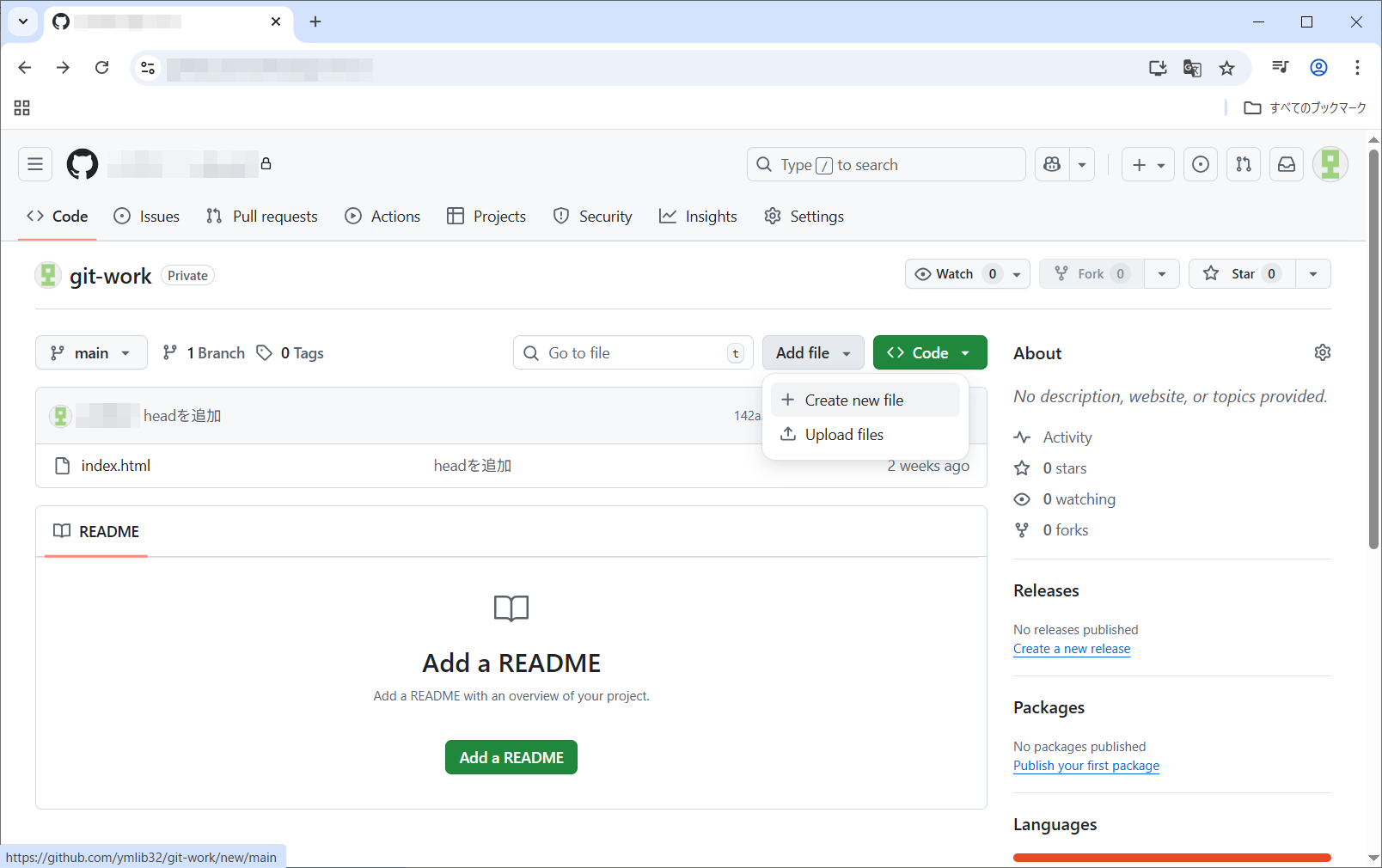
新しいファイルの作成画面が開きました。
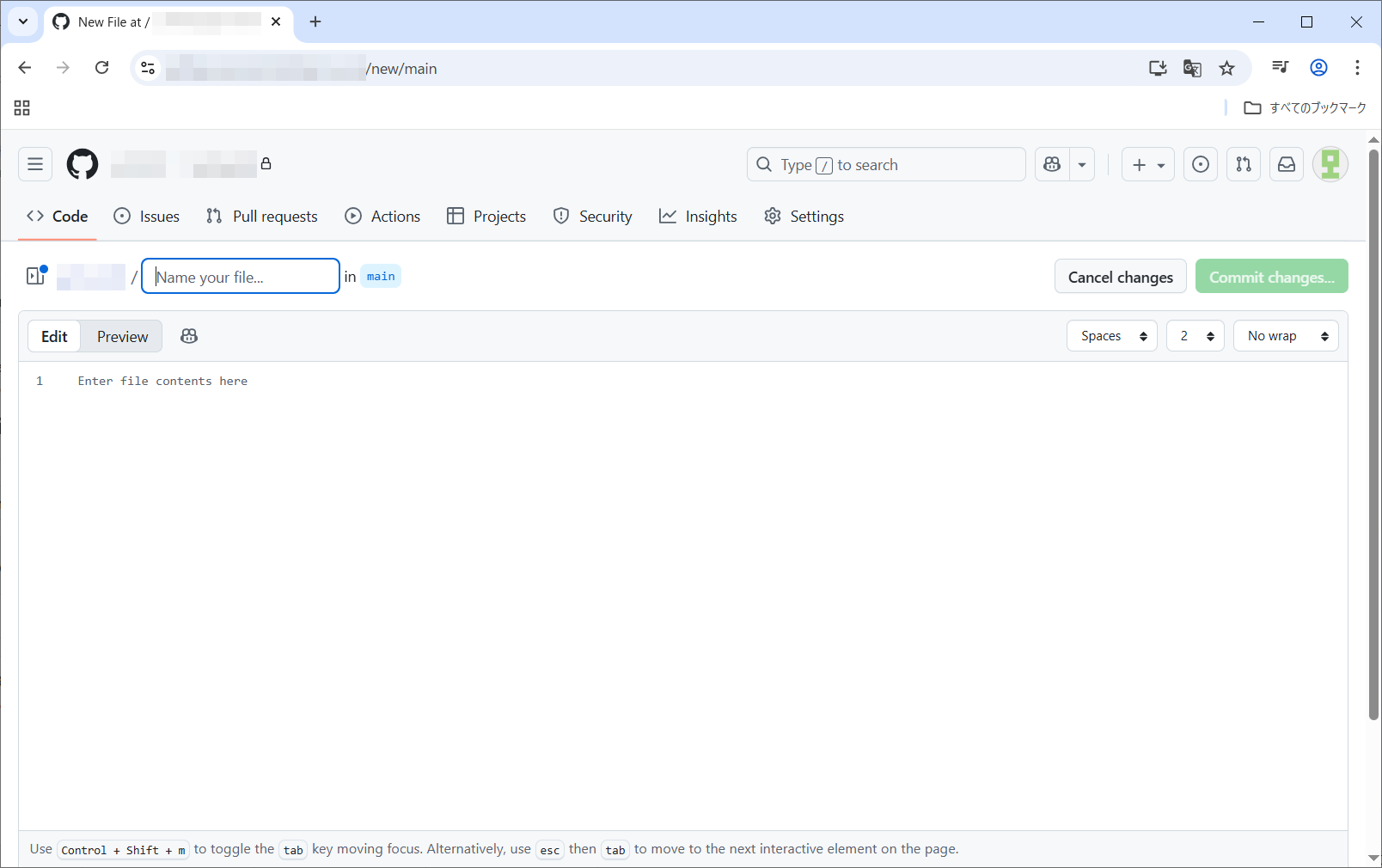
memo.mdという名前で内容は#GitHub memoだけ記載し右上のCommit changes...をクリックします。
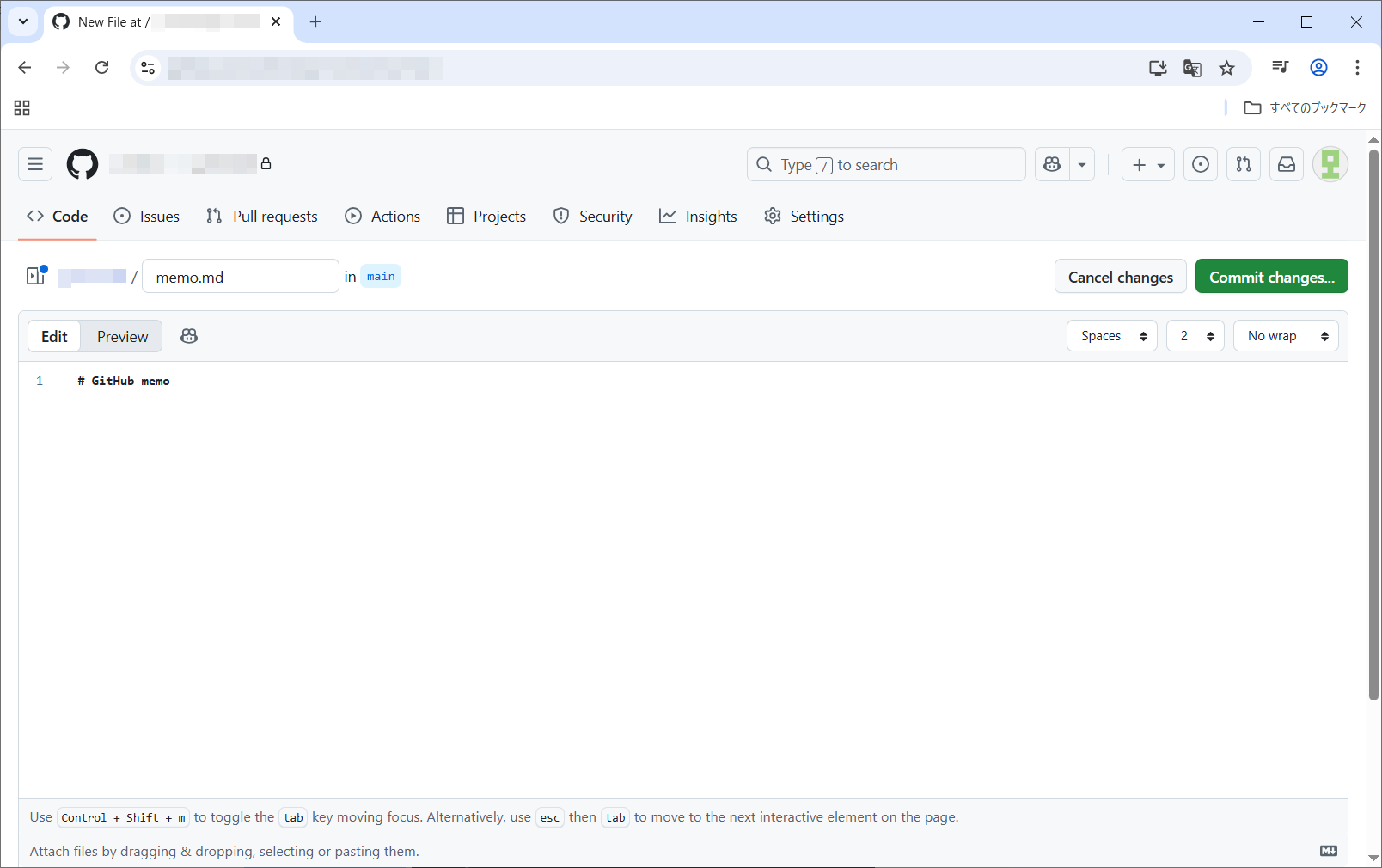
Commit changesをクリックします。
memo.mdファイルが追加されました。
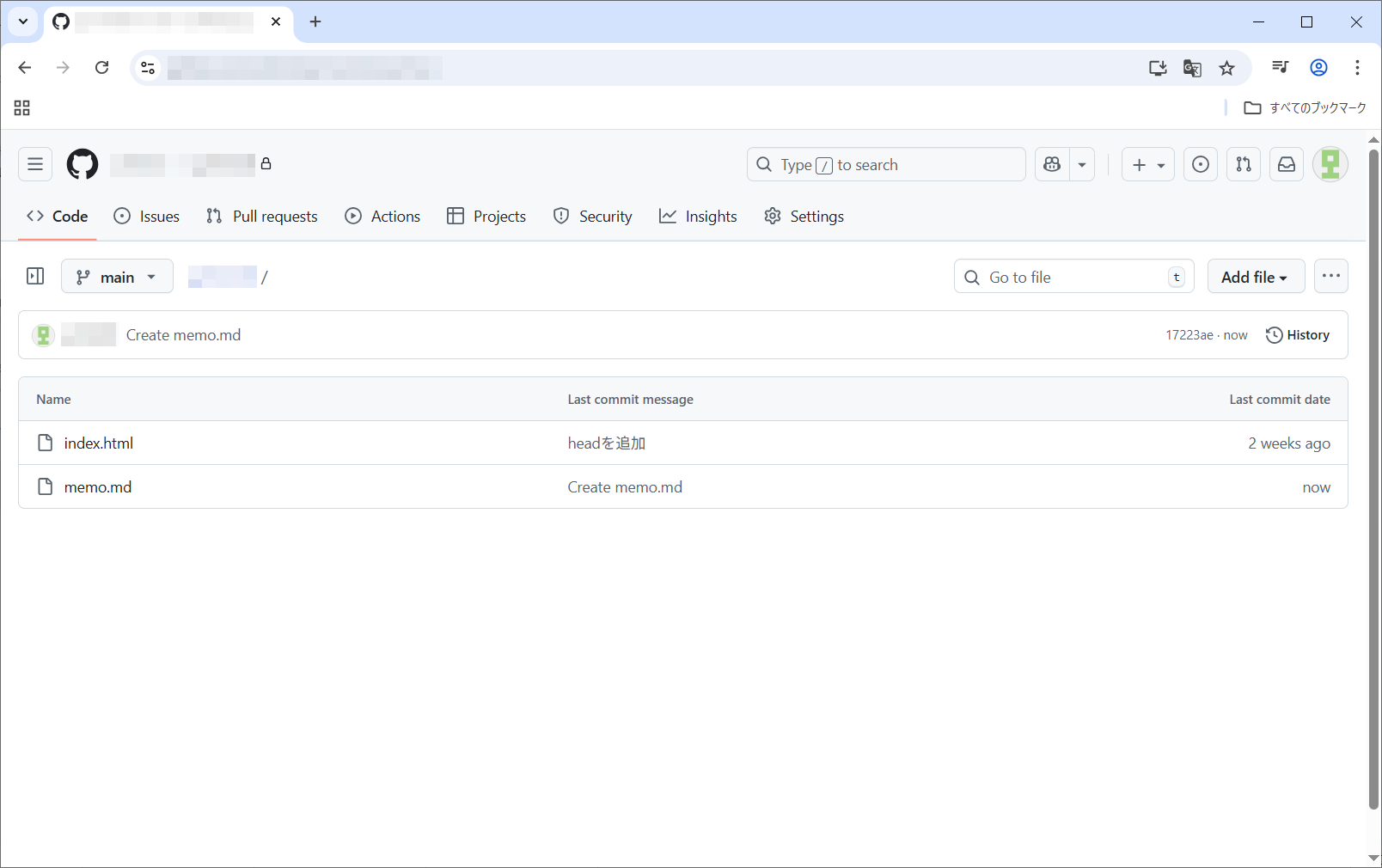
get fetchを実行したところリモートリポジトリの変更をローカルリポジトリに取り込んだようです。
remote: Enumerating objects: 4, done.
remote: Counting objects: 100% (4/4), done.
remote: Compressing objects: 100% (2/2), done.
remote: Total 3 (delta 0), reused 0 (delta 0), pack-reused 0 (from 0)
Unpacking objects: 100% (3/3), 934 bytes | 233.00 KiB/s, done.
From github.com:ymlib/gitwork
142a22e..17223ae main -> origin/main
ブランチの状態を確認します。
* main
remotes/origin/HEAD -> origin/main
remotes/origin/main
今いるブランチに*マークが付いています。 remotes/origin/mainにfetchした変更が取り込まれたようです。
自分のワークツリーの内容をremotes/origin/mainにふりかえてみます。
Note: switching to 'remotes/origin/main'.
You are in 'detached HEAD' state. You can look around, make experimen
 tal
talchanges and commit them, and you can discard any commits you make in
thisstate without impacting any branches by switching back to a branch.
If you want to create a new branch to retain commits you create, you
maydo so (now or later) by using -c with the switch command. Example:
git switch -c
Or undo this operation with:
git switch -
Turn off this advice by setting config variable advice.detachedHead t
o falseHEAD is now at 17223ae Create memo.md
フォルダの内容を確認したところmemo.mdが取り込まれていました。
ドライブ C のボリューム ラベルは OS です
ボリューム シリアル番号は C43E-C3C1 です
C:\git-work のディレクトリ
2025/10/04 18:48 <DIR> .
2025/10/04 18:48 <DIR> ..
2025/09/20 18:22 138 index.html
2025/10/04 18:48 15 memo.md
2 個のファイル 153 バイト
2 個のディレクトリ 88,646,541,312 バイトの空き領域
ワークツリーをmainにもどします。
Previous HEAD position was 17223ae Create memo.md
Switched to branch 'main'
Your branch is behind 'origin/main' by 1 commit, and can be fast-forw
arded.(use "git pull" to update your local branch)
フォルダの内容を確認したところmemo.mdは表示されませんでした。 memo.mdはワークツリーには取り込まれていないようです。
ドライブ C のボリューム ラベルは OS です
ボリューム シリアル番号は C43E-C3C1 です
C:\git-work のディレクトリ
2025/10/04 18:51 <DIR> .
2025/10/04 18:51 <DIR> ..
2025/09/20 18:22 138 index.html
1 個のファイル 138 バイト
2 個のディレクトリ 88,650,715,136 バイトの空き領域
ワークツリーに変更を取り込みます。
Updating 142a22e..17223ae
Fast-forward
memo.md | 1 +
1 file changed, 1 insertion(+)
create mode 100644 memo.md
フォルダの内容を確認したところmemo.mdが取り込まれていました。
ドライブ C のボリューム ラベルは OS です
ボリューム シリアル番号は C43E-C3C1 です
C:\git-work のディレクトリ
2025/10/04 21:36 <DIR> .
2025/10/04 21:36 <DIR> ..
2025/09/20 18:22 138 index.html
2025/10/04 21:36 15 memo.md
2 個のファイル 153 バイト
2 個のディレクトリ 87,897,026,560 バイトの空き領域
リモートの状態を確認します。
* remote origin
Fetch URL: git@github.com:ymlib/gitwork.git
Push URL: git@github.com:ymlib/gitwork.git
HEAD branch: main
Remote branch:
main tracked
Local branch configured for 'git pull':
main merges with remote main
Local ref configured for 'git push':
main pushes to main (up to date)
一通り動作しました。
Copyright (C) 2025 ymlib.com