WebClient② UploadData
2014/03/17
System.Net.WebClientを使って文字列を送信してみます。
◆環境
| OS |
Windows 7 Professional Service Pack 1 64bit |
| C# |
Microsoft Visual C# 2010 01018-587-4054044-70237 |
[ファイル]-[新規作成]-[プロジェクト]を選択。
[Windows フォーム アプリケーション]を選択し、名前に「WebClientTest2」と入力し「OK」。
フォーム上に以下のようにLabel、TextBox、ボタンを配置します。
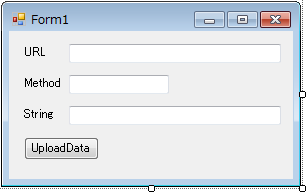
ボタンをダブルクリックしてコードを編集します。
|
Form1.cs
|
1:
2:
3:
4:
5:
6:
7:
8:
9:
10:
11:
12:
13:
14:
15:
16:
17:
18:
19:
20:
21:
22:
23:
24:
25:
26:
27:
28:
29:
30:
31:
32:
33:
34:
35:
36:
37:
38:
39:
40:
41:
42:
43:
44:
45:
|
using System;
using System.Collections.Generic;
using System.ComponentModel;
using System.Data;
using System.Drawing;
using System.Linq;
using System.Text;
using System.Windows.Forms;
namespace WebClientTest2
{
public partial class Form1 : Form
{
public Form1()
{
InitializeComponent();
textBox1.Text = "http://localhost/paramList.php";
textBox2.Text = "POST";
textBox3.Text = "Hello WebClient!!";
}
private void button1_Click( object sender, EventArgs e )
{
System.Net.WebClient web
= new System.Net.WebClient();
web.Headers.Add( "Content-Type", "text/plain" );
byte[] data
= Encoding.ASCII.GetBytes( textBox3.Text );
byte[] res
= web.UploadData( textBox1.Text
, textBox2.Text
, data
);
string msg
= System.Text.Encoding.UTF8.GetString( res );
MessageBox.Show( msg );
}
}
}
|
|
実行してみます。
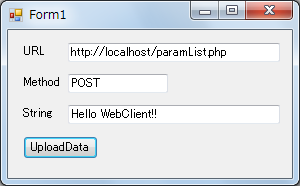
POST内容表示で作った paramList.php をWebサーバー上のルートディレクトリに配置しておく必要があります。
UploadDataボタンを押します。
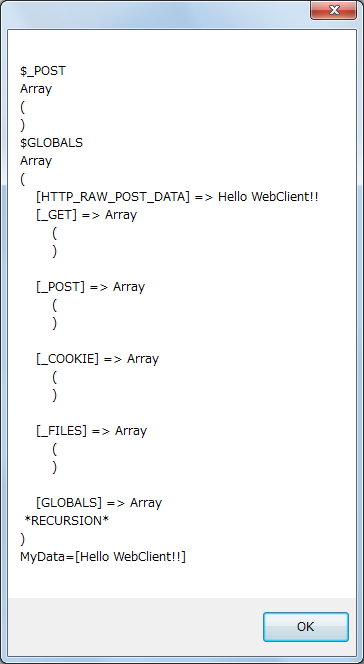
正常に動作しました。
POSTで送ったはずですが、なぜか $_POST では参照できず、$HTTP_RAW_POST_DATAという変数に入っていました。
▲ PageTop ■ Home
Copyright (C) 2014 ymlib.com
